
4
Introduction
When you send or receive an important letter or parcel, the first thing you want to know is where it has reached. That’s why many users search for www indiapost gov in tracking status to check real-time delivery updates directly from the official India Post website.
India Post provides a simple online tracking system that helps you monitor your Speed Post, Registered Post, or parcel from booking to final delivery.
What Does “India Post Tracking Status” Mean?
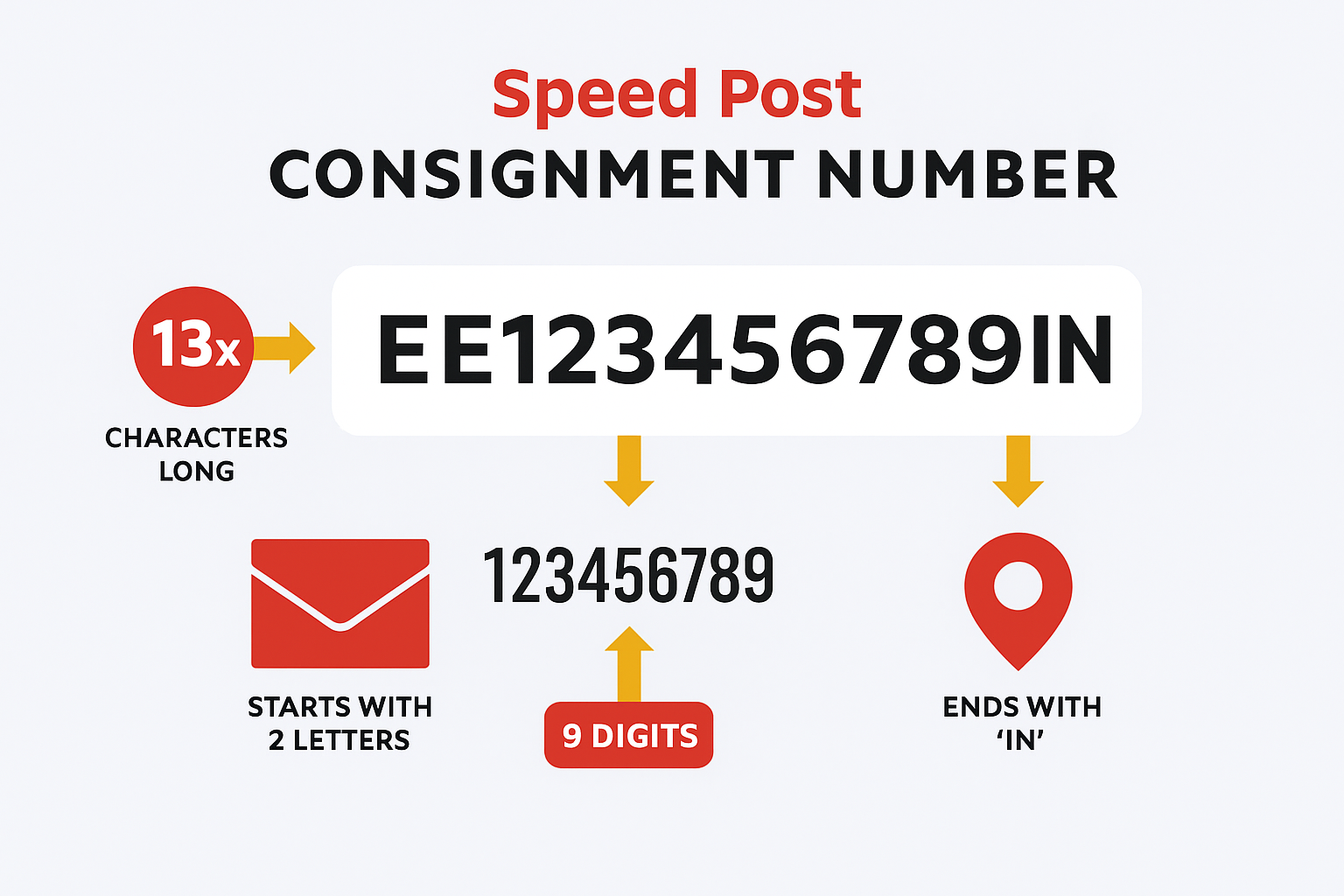
The tracking status shows the current stage of your postal item. Once an article is booked, India Post assigns it a 13-character tracking (consignment) number, which is used to view status updates online.
Using www indiapost gov in tracking status, you can see:
- Booking confirmation
- Transit movements
- Out-for-delivery updates
- Final delivery confirmation
How to Use www indiapost gov in Tracking Status

4
Follow these simple steps:
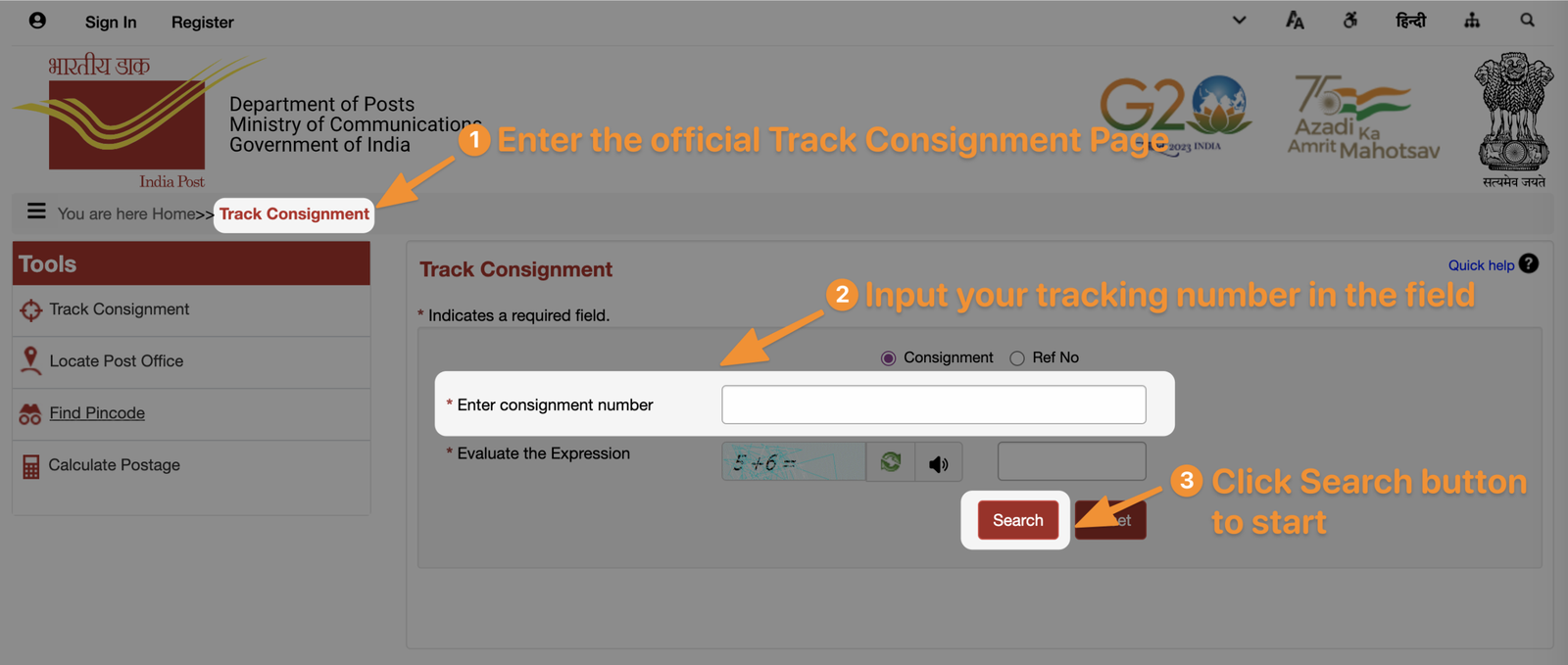
Step 1: Visit the Official Website
Open www.indiapost.gov.in in your browser.
Step 2: Find “Track Consignment”
On the homepage, locate the Track Consignment / Track & Trace option.
Step 3: Enter Tracking Number
Enter your 13-digit tracking or consignment number exactly as printed on your receipt.
Step 4: Fill the Captcha
Complete the captcha code shown on the screen.
Step 5: Click Track
Your India Post tracking status will appear instantly.
This is the exact method users mean when they search www indiapost gov in tracking status.
Common India Post Tracking Status Messages
Here are the most common tracking updates and what they mean:
- Item Booked – Article accepted at the post office
- Item Received – Reached a sorting or transit office
- Item Dispatched – Sent to the next destination
- Out for Delivery – With the delivery postman
- Delivered – Successfully delivered to the recipient
These updates help you understand the progress of your shipment.
Articles You Can Track Using India Post
You can use www indiapost gov in tracking status for:
- Speed Post
- Registered Post
- Parcels
- EMS / International Speed Post
- Business Post items
Ordinary letters usually do not support online tracking.
Other Ways to Check India Post Tracking Status
Apart from the website, you can also track using:
SMS Tracking
Send:
POST TRACK <Tracking Number>
to 166 or 51969
India Post Mobile App
Use the official Postinfo app to check tracking status on your phone.
Common Problems While Checking Tracking Status
- Tracking number entered incorrectly
- Status not updated immediately after booking
- Temporary website issues
- Very old tracking numbers
If status doesn’t show, wait a few hours and try again.
Sending Trackable Letters Easily
Tracking is especially useful for:
- Job applications
- Legal notices
- Business documents
- Government forms
If you want to send letters online with physical delivery and tracking across India, PostPatra lets you write letters digitally and sends them as real, trackable mail—without visiting a post office.
👉 https://postpatra.com
FAQs: www indiapost gov in Tracking Status
How many digits are in an India Post tracking number?
India Post tracking numbers usually have 13 characters.
How soon does tracking status update?
Usually within a few hours after booking.
Can I track India Post without a tracking number?
No, the tracking number is mandatory.
Is India Post tracking free?
Yes, tracking on www.indiapost.gov.in is completely free.
Conclusion
Using www indiapost gov in tracking status is the easiest and most reliable way to check where your India Post parcel or Speed Post item is. With just a tracking number, you can stay updated at every delivery stage and avoid unnecessary worry.
Whether you’re sending documents or important letters, understanding India Post tracking helps you stay informed and confident.
Leave a Reply